Context: Modernizing Financial Record Retrieval
A dedicated search results page was required for front- and back-office users searching correction notices (financial transaction amendments). The feature is part of the Driver and Vehicle Internal Solution, a large-scale enterprise platform currently undergoing modernization to improve operational efficiency and transaction management.
System Background
The Driver and Vehicle Internal Solution is part of the broader ServiceOntario application ecosystem. It is an internal, over-the-counter platform used exclusively by licensed ServiceOntario agents (“tills”) to process high-stakes citizen services such as identity verification and official document issuance.
👉 Large-scale, multi-team system with complex transactional workflows.
Problem Statement: Providing Fast and Reliable Access to Financial Amendments
Financial correction notices are critical operational records that require accurate retrieval, sorting, and navigation. The new search experience needed to support complex business rules, large datasets, and future backend integration while maintaining a responsive and user-friendly interface.
Execution Approach
Step 1: Analyzing the User Story
I began by studying the functional requirements, identifying business rules, and uncovering potential edge cases before writing any code.
▶ Watch walkthrough — Breaking Down the User Story and Business Rules
Step 2: Surveying the Existing Codebase
The search results page is triggered from the Correction Notices search filter (one of three available search modes). Reviewing the submission logic revealed that both the Redux dispatch payload and endpoint request needed to be customized for each search type.
The first objective therefore became twofold: building the missing search submission package and creating the new search results component.
▶ Watch walkthrough — Engineering the Existing Search Workflow
Step 3: Building the missing search submission package
I refactor the search trigger function to build a query package and send it to a new route (search result route).
▶ Watch walkthrough — Creating a Route-Based Search Submission Pipeline
Step 4: Creating the Search Results Component
The search payload is now successfully routed to the new page. To accelerate development, I duplicated an existing search results component and adapted its layout to match the design prototypes.
Although the new component rendered correctly, it was not yet processing the incoming query. The table structure remained incorrect, no data was displayed, and an error alert appeared because the business logic had not yet been adapted.
The next step was the refactor the component's logic.
▶ Watch walkthrough — Bootstrapping the Search Results Component
Step 5: Refactoring the Search Results Business Logic
The component now needed to process the URL-based query correctly and reshape the returned data into the required table format.
▶ Watch walkthrough — Refactoring Search Logic and Data Mapping
Despite the refactoring effort, no results were returned because the search endpoint produced a 404 response. After confirming with the backend team that the API was still under development, I introduced a mock data layer based on the Swagger response schema.
▶ Watch walkthrough — Decoupling UI Development from Backend Availability
Step 6: Validating Against the User Story
With the majority of the implementation complete, I performed another pass against the user story to identify missing behaviors and compliance gaps. GitHub Copilot assisted by comparing the implementation against the documented requirements and generating a structured gap analysis.
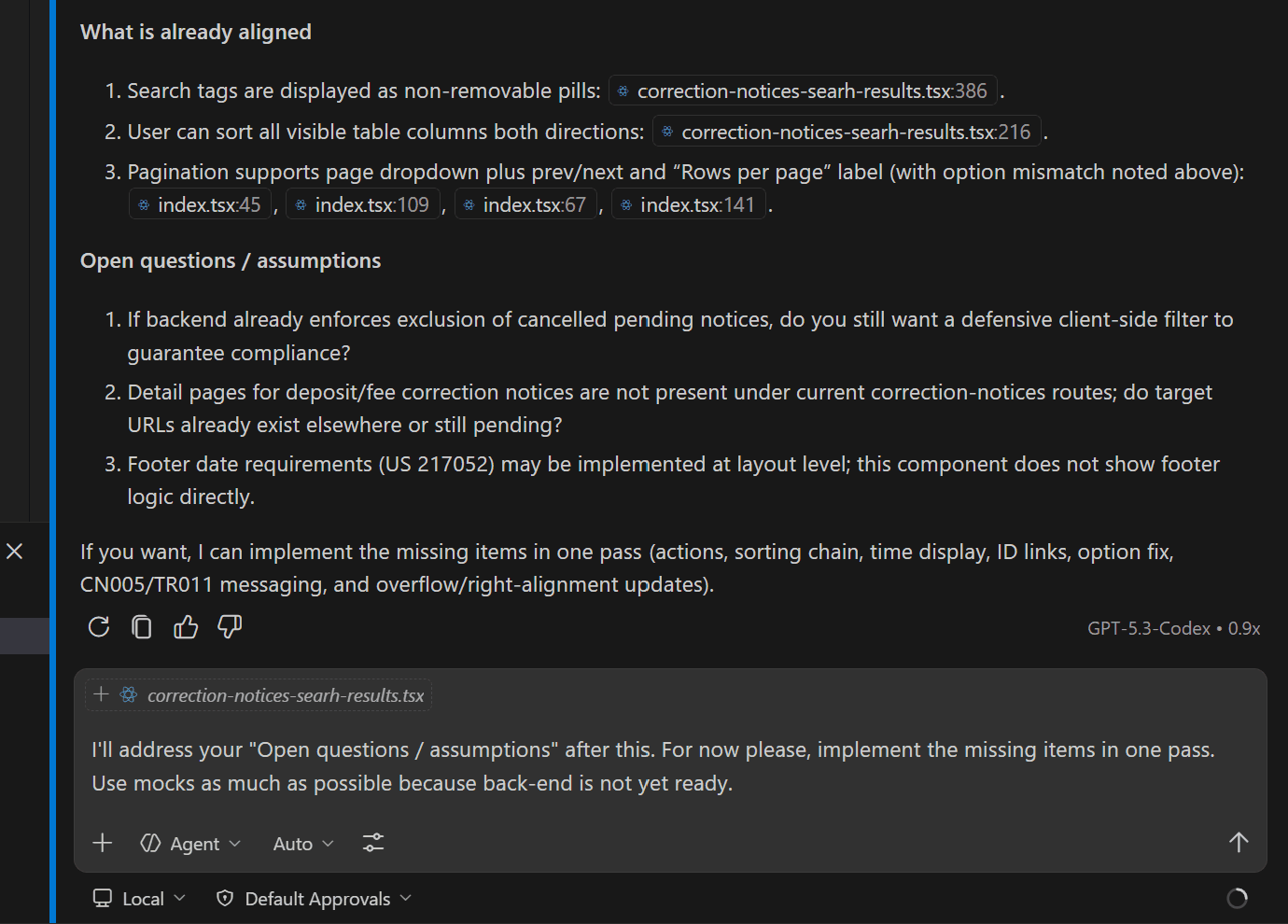
At this stage, approximately 90% of the feature complied with the user story, including search detail tags, sortable results tables, pagination, clickable record IDs, and mock-driven navigation flows.
The remaining work consisted primarily of cross-team discussions around implementation details and edge cases.
Examples include:
Backend collaboration: the frontend currently excludes specific correction notices as a temporary safeguard while the backend API is unavailable. Once production APIs are available, should this client-side filtering remain?
UX collaboration: navigation failure scenarios are partially implemented, but additional validation is required to ensure all user journeys are covered.
▶ Watch walkthrough — Comparing the Final Implementation Against Design Prototypes
The Assistance of GitHub Copilot
GitHub Copilot, under my direction, accelerated development by generating boilerplate code, automating repetitive implementation tasks, and assisting with complex business logic. This reduced cognitive overhead and allowed me to focus on system architecture, integration strategy, and requirement validation.
Next step
The next phase will focus on replacing the temporary mock layer with production APIs and resolving the remaining cross-team edge cases. By separating UI development from backend readiness, the feature can continue evolving incrementally while reducing integration risk and accelerating overall delivery.